
Agency Dashboard
Collections, rent invoices, and tenant follow-ups
How to use the Collections Center to review expected, collected, and outstanding rent, identify overdue balances, and record payments cleanly.
Product Screenshots
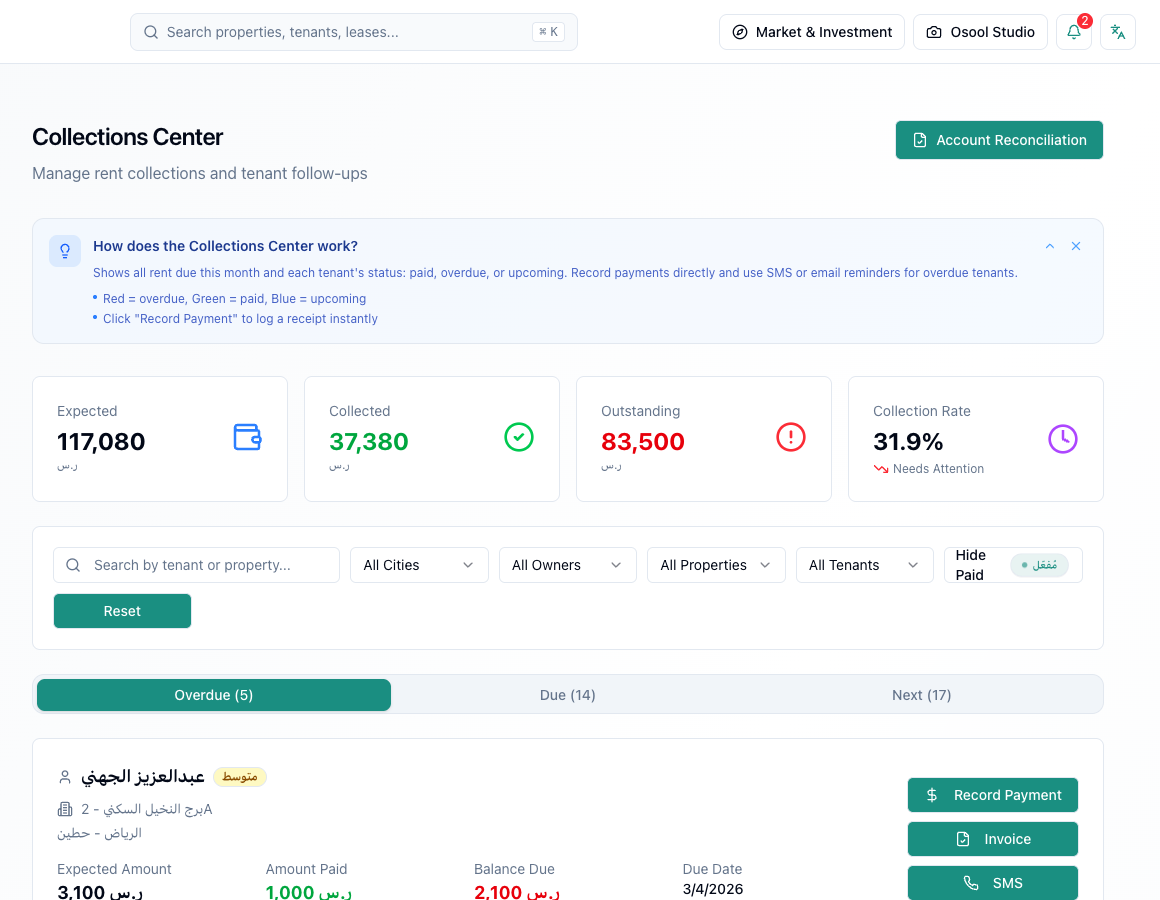
What to read in the Collections Center
The Collections Center shows expected rent, collected rent, outstanding balances, and collection rate. These numbers help you see whether the month is on track or needs intervention.
Split follow-up into three states: overdue, due soon, and paid. This avoids mixing tenants who already paid with tenants who need reminders.
- Expected
- Collected
- Outstanding
- Collection rate
- Tenant status
Record payments in an auditable way
When a payment is received, connect it to the correct lease or invoice, enter the amount and date, and confirm the payment method. Do not rely only on a transfer screenshot without recording it in the platform.
If the payment is partial, record it as partial rather than changing the lease amount. Editing the lease to hide a short payment will distort reports later.
Follow up overdue rent without chaos
Use the overdue list to prioritize by largest amount, longest delay, or tenants who repeatedly pay late. Then choose the contact method based on agency policy.
When SMS or email actions are available in the workflow, review the message before sending and record the outcome so the team knows the next step.
- Prioritize
- Review tenant history
- Send the right reminder
- Record the outcome
- Escalate when needed
Important limits
Any online collection, invoice, or receipt should be reviewed according to the payment settings and integrations enabled for the agency. If an integration is not enabled, treat the process as internal operations rather than a fully automated payment flow.
Operational numbers to review before deciding
Use this article together with dashboard metrics: collection rate, overdue rent, expiring leases, open expenses, owner balances, and alerts.
If the decision affects an owner, tenant, or financial transaction, ask the responsible role to review the record before execution.
- Collection rate
- Overdue rent
- Leases
- Expenses
- Owner balances
- Alerts
How to apply this inside the agency
Turn the article into a small dashboard action: open the related record, review the data, make the appropriate update, then document the outcome so the rest of the team can see it.
If the action involves a financial, regulatory, owner, or tenant-impacting decision, ask the responsible role to review it before final approval.
- Open the record
- Review data
- Take action
- Document outcome
- Escalate when needed
Product status and review needed
This is documented as an available workflow, but results can still vary by user permissions, agency settings, and data quality.
If a step described here is not visible in the agency dashboard, treat it as not enabled for your account and check with your admin or Product.
Related Articles
Tenants
Tenant records and portal basics
Tenant profile, lease, payments, and tenant-facing portal basics.
Read articleOsool AI CFO
Cashflow, collections, and revenue visibility
How AI CFO helps read collections, overdue balances, and cashflow while some coverage remains in progress.
Read articleTroubleshooting
Quick fixes for common issues
What to do when login fails, data is missing, or a listing cannot be published.
Read article